Free Puzzle Tool
Kanoodle Solver
Stuck on a Kanoodle card? Color in the pieces that are already on your board, or snap a photo of your tray, then press Solve. The solver finishes the 5×11 tray or the pyramid in a fraction of a second, or gives you one piece at a time if you only want a nudge.
1. Pick a piece
2. Tap or drag across the holes it covers
Tap a colored hole again to erase it. In an answer, your pieces have a white ring.
Layer 1 is the bottom of the pyramid. A piece that climbs between layers covers holes on more than one layer.
Line up your photo
Drag each orange dot onto the middle of a corner hole of the tray. The green circles show where every hole will be read, so check that they sit on the holes, then press Read board.
Your photo stays on your device. It is read right here in your browser and never uploaded.
How to use the Kanoodle solver
- Open your booklet to the card you're stuck on.
- Choose Flat tray or Pyramid to match your card, then pick a piece color and tap each hole it fills. Drag to fill several at once. For the flat tray you can instead press From a photo and line up a picture of your tray.
- Repeat for every piece shown on the card. Each piece gets a check mark once its shape is right.
- Press Hint to reveal one missing piece, or Solve for the whole answer.
The address bar updates as you go, so you can bookmark a board or send it to someone who is stuck on the same card.
Solve a Kanoodle from a photo
Already took a picture of your stuck board? Press From a photo and pick it, or take a new one. Then drag the four orange dots onto the middle of the tray's four corner holes. Green circles show where every hole will be read, so you can see them line up before you press Read board.
The pieces appear on the board above. Any hole the reader wasn't sure about gets a dashed yellow outline: check those against your tray, fix any that are wrong, and press Solve or Hint. If your photo was upside down, press Rotate 180°. A photo taken from above in good light reads best, and it works whatever colors your set's pieces are, because every Kanoodle piece has its own shape.
Your photo never leaves your device: it's read right here in your browser and isn't uploaded. Photos work for the flat tray only. A pyramid hides most of its holes, so enter it by hand.
Kanoodle answers for any booklet challenge
Looking for the answer to a numbered challenge, like challenge 180? We don't reprint the booklet's answer pages, but you don't need them: copy that card's starting position onto the board above and press Solve. It handles the original Kanoodle booklet's flat-tray and pyramid challenges, and starting positions you make up yourself.
If you only want a nudge, press Hint to see one piece and keep going on your own. Some cards can be finished more than one way, so the solver's answer may not match the one in your booklet. Both are correct if every piece fits. For tips on solving cards without help, read our Kanoodle solutions guide.
What a solved Kanoodle looks like
A solved Kanoodle uses all 12 pieces and fills every one of the 55 holes, with no gaps and no piece left over. On the flat tray that is a full 5×11 rectangle. In pyramid mode the same 55 balls stack into five layers, from the 5×5 base up to a single ball on top. These are two real solutions found by the solver:
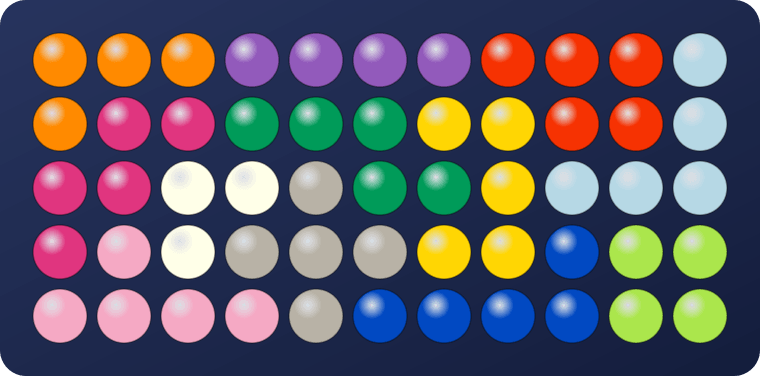
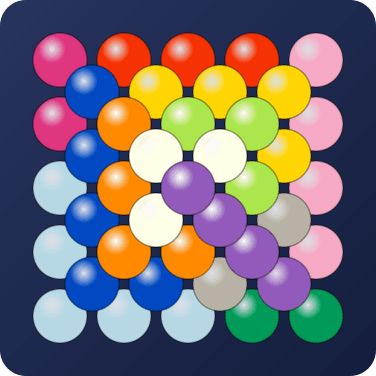
There are thousands of ways to fill the tray, so yours can look completely different and still be right.
Kanoodle puzzle generator (random challenges)
Finished the booklet, or left it at home? Pick Easy, Medium or Hard under Random challenge for a fresh Kanoodle starting position. Copy it onto your board and solve it yourself, with Hint and Solve there if you need them. Want puzzles that come with clues instead? Katachi-Go has a new one every day.
Frequently Asked Questions
How does the Kanoodle solver work?
It treats the board as an exact-cover problem: every empty hole must be covered exactly once, and every remaining piece must be used exactly once. It tries each remaining piece in every rotation and flip, backs out of any placement that leaves a hole nothing can fill, and uses Donald Knuth's Algorithm X to do it in a fraction of a second. For the history behind the puzzle itself, see who invented Kanoodle.
Why does the solver say there is no solution?
Every card in the Kanoodle booklet can be solved, so a no-solution result has one of two causes. If you copied the board from a card, one of the pieces probably doesn't match it. The most common mistake is a piece that is flipped over: its mirror image fits the same holes but leaves a different gap. If you placed some pieces yourself, one of them may have sealed off a pocket of empty holes that your remaining pieces can't fill. When a pocket's size alone makes it impossible, the solver outlines it in red. See why some Kanoodle boards can't be finished.
Where can I find the answer to a Kanoodle challenge?
Copy the challenge's starting position from your booklet onto the board above and press Solve. You get the answer to any numbered card in under a second. Hint shows one piece at a time if you'd rather finish it yourself.
Can I solve Kanoodle from a picture?
Yes, for the flat tray. Press From a photo, choose a picture of your board, and drag the four dots onto the corner holes. The solver reads which pieces are already placed and puts them on the board. Holes it isn't sure about are outlined so you can check them, then press Solve or Hint. The photo is read in your browser and never uploaded.
Does every Kanoodle puzzle have only one solution?
Not always. Many booklet cards have exactly one way to finish, but some starting positions have several. The solver counts them, up to 100, and lets you step through each one.
Will this spoil the puzzle?
Only if you want it to. The Hint button reveals one piece at a time, working left to right across the tray, or bottom-up in the pyramid, so you can take a single nudge and finish the rest yourself. If you'd rather learn to crack the cards on your own, our Kanoodle solving guide covers the techniques.
Does it solve the Kanoodle pyramid?
Yes. Choose Pyramid above the board, then color in each layer from the bottom up: Layer 1 is the 5×5 base and Layer 5 is the single hole at the top. A piece that climbs between layers covers holes on more than one layer. Hints for the pyramid come bottom-up, the order you would build it.
Is there a free Kanoodle puzzle generator?
Yes, this page is one. Press Easy, Medium or Hard under Random challenge and the solver builds a new starting position from a randomly solved board: 4, 6 or 8 pieces left to place on the flat tray, or 2, 3 or 4 at the top of the pyramid. Set it up on your own board, and use Hint or Solve if you get stuck. Every challenge can be finished, because it starts from a real solution. Each one gets its own link, so you can send it to a friend.
Which Kanoodle set does it use?
The original 12-piece Kanoodle, pieces A through L. Other editions such as Kanoodle Extreme, Kanoodle Genius, and Kanoodle Jr. use different pieces or boards and are not supported.

Like Kanoodle? Try Katachi-Go
Our own puzzle in the same family, built so you solve it with logic instead of guesswork: clues on the board show where pieces belong, and every puzzle has exactly one solution. Play free in your browser, with thousands of puzzles and a new one every day. No download, no sign-up.
Kanoodle is a trademark of Educational Insights. Hoffmakers is not affiliated with or endorsed by Educational Insights. This free tool works with a puzzle you already own; it doesn't reproduce the booklet or its answers.